Practice Score Tracker: Log Mock Scores, See Your Trend
19 thg 11, 2026
Anyone who has spent an evening working through solved problems knows the feeling.
Anyone who has spent an evening working through solved problems knows the feeling. You read a worked solution, you see exactly where your own attempt went wrong, and you nod. Then the next problem arrives and you do it all again. What that routine rarely tells you is the bigger question: across a whole week of practice, are you actually getting better?
Certification study has the same gap. A single practice test shows you a number, and by the next evening the number is half forgotten. A small free tool from Be Ready Education tries to close that gap, and this article looks at what it does, what it does not do, and who is likely to get value from it.
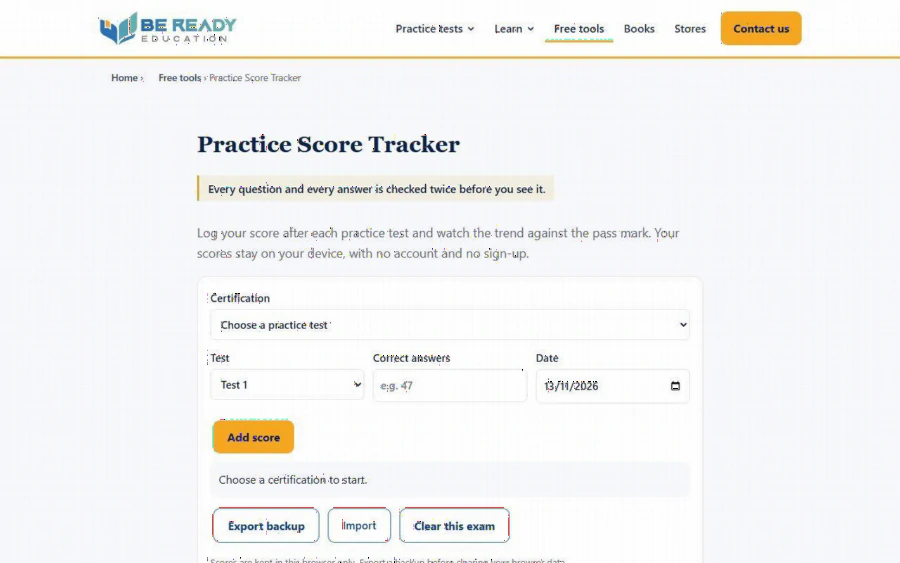
The Practice Score Tracker page on Be Ready Education, showing the certification menu, the test and correct answers fields, and the Add score button
The problem: scores that vanish
Most people who prepare for a vendor certification take several timed practice tests. The scores end up in three places at once: a note on a phone, a half-remembered "I think I got around seventy percent," and a browser tab that has long since been closed. When it is time to decide whether to book the exam, you are guessing.
There is a second problem hiding underneath. A raw count of correct answers is hard to read. Forty-two out of 60 and 51 out of 75 are different quantities until you turn them into percentages, and neither means much until you set it beside the pass mark. Doing that by hand after every test is the kind of small chore that gets skipped exactly when you are tired.
What the tool does
The practice score tracker is a single page that turns those scattered numbers into one trend line. According to the how-to section on the page, the workflow has four steps:
1. Choose your certification. Its question count and pass mark load automatically.
2. Add a score for each test: which test, how many answers were correct, and the date.
3. Read the chart to see whether you are above the pass mark and the target line.
4. Export a backup file if you want to keep your scores or move them to another device.
The certification menu on the page lists 36 certifications, and the page names examples such as CAPM, AWS AIF-C01, KCNA and ISC2 CC. The table it builds has columns for date, test, score, percentage and correct answers. The percentage is the number of correct answers divided by the number of questions in that practice test, using the question count of Be Ready Education's own tests for the chosen certification, as the page's FAQ explains.
The page also states the pass-mark logic it uses for its readiness message. According to its FAQ, the tracker treats you as ready when your last two scores are both at or above the pass mark of the site's tests plus 10 points, capped at 95 percent. The page itself calls this a rule of thumb, not a guarantee, and that is the right way to read it.
Where your data lives
For a free tool, the privacy arrangement is the part most worth reading carefully. The page says your scores stay on your device, with no account and no sign-up. In the FAQ it adds that scores are kept in your browser only, in local storage, and that the site does not collect, store or send what you enter and sets no cookies.
That design has a practical consequence, and the page is upfront about it: clearing your browser data removes the scores. The footer of the form reminds you to export a backup before you do that. The Export backup button saves a small file, and the Import button on another device restores it. If you study on a laptop at home and a phone on the train, the export and import pair is how you keep one history.
I would treat this as a feature with a cost. You get a tool that needs no login and holds nothing on a server. You also take on the small job of exporting now and then. Someone who wipes their browser every week should build that habit from day one.
A realistic week with the tracker
Here is how a student might use it, described as a plan rather than a result. Suppose you are preparing for one certification and you take a timed test on Monday, Wednesday and Friday.
After each test you open the page, pick the certification, enter the test number, the correct answers and the date, and press Add score. The point is not the first number. The point is the second and third. If the percentages climb and cross the target line, your study notes are working. If they sit flat just under the pass mark, the chart shows you that early, while there is still time to change what you do.
That second case is where the tool is most useful. Flat scores usually mean the same weak area is costing you the same questions each time. A tracker will not tell you which area it is, because it records totals, not topics. But it tells you to stop re-taking tests and go back to the material. Be Ready Education also publishes domain pages for several exams that break a certification into its published topic areas, which is a natural next step once the chart tells you something is stuck.
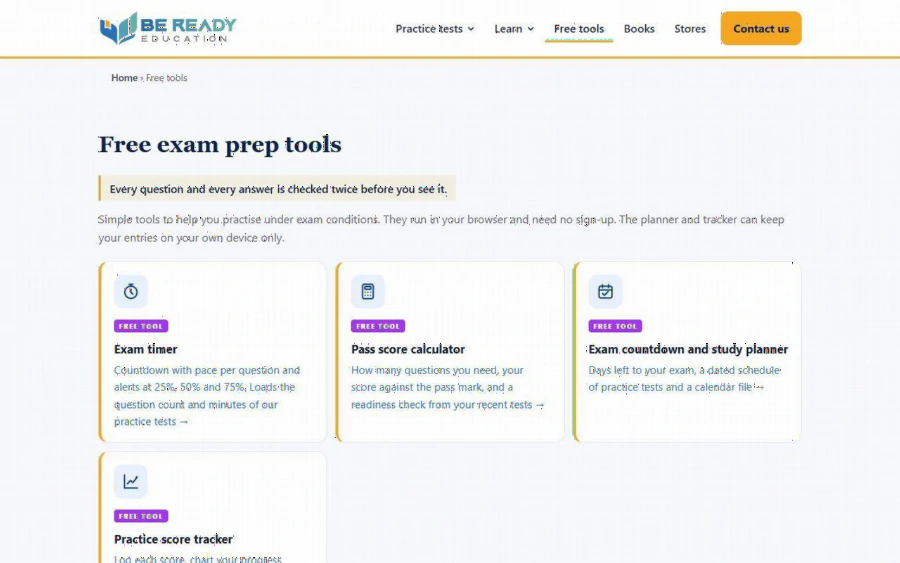
The Free exam prep tools page on Be Ready Education, listing the exam timer, pass score calculator, countdown planner and score tracker
Limits worth knowing
A fair review should say what the tool is not.
First, it is a logbook with a chart, not a study system. It does not generate questions or explain answers. Its value depends on taking practice tests somewhere else and entering the results yourself.
Second, the pass marks and question counts come from Be Ready Education's own practice tests, not from a vendor. The page says so plainly and points readers to the provider's own pages for the exact details of each exam. The site also states that it is not affiliated with or endorsed by any certification vendor or exam body, and that its practice questions are written independently. If you log scores from a different publisher's tests, the percentages will still be arithmetic you can trust, but the built-in pass mark will not match that publisher's format.
Third, the page does not describe the chart type or how the target line is set beyond what is quoted above, so do not expect statistical modelling. It is a simple visual check.
Fourth, the data lives in one browser on one device unless you export it. That is a strength for privacy and a weakness for convenience.
Who should use it, and who can skip it
The tracker suits people who already take timed practice tests and want to see a trend: career changers moving into IT, project managers preparing for a credential, and students who like to measure progress instead of trusting a feeling. It is also a gentle fit for people who dislike creating yet another account.
It is less useful if you have not started practicing yet, since an empty tracker only says "Choose a certification to start." It is also not for anyone looking for a coach or a prediction. No tool can promise a result on exam day, and this one does not try.
Pairing it with the rest of the toolkit
The tracker sits among four free tools listed on the free exam prep tools page. The others are an exam timer with pace per question and alerts at 25, 50 and 75 percent, a pass score calculator that shows how many questions you need, and an exam countdown and study planner that gives days left, a dated schedule of practice tests and a calendar file. The listing says they run in your browser and need no sign-up.
A sensible sequence is to plan the schedule first, run each test against the timer, then log the result in the tracker. Used together, they cover the habits that decide whether practice turns into progress: spacing the tests out, keeping to the clock, and looking at the numbers honestly.
How to start today
You can begin in about two minutes. Open the page, choose the certification you are studying, and enter the most recent practice test you can remember, with its date. Add the next one when you finish it. After three entries you will have a trend, and after five you will have a better basis for the "should I book the exam?" decision than a gut feeling.
Export a backup once a week, keep your tests honest, and let the chart do the remembering. That small change, recording what you did instead of trusting what you recall, is the same habit that makes worked solutions useful in the first place.
Tổng số đánh giá:
Xếp hạng: / 5 sao